 KeepScribe
Offline transcription for iPhone
Your recordings and transcripts stay on your iPhone
KeepScribe turns recordings into transcripts with speaker labels, entirely on device. Nothing is uploaded and no internet is needed, so it works in airplane mode. Transcription is free with no time limit.
The app is in Simplified Chinese and transcribes Mandarin, including Mandarin mixed with English.
- No account
- No server
- No data collected
与张律师的当事人会谈Client meeting with Lawyer Zhang
张律师 Lawyer Zhang
签约的时候有没有其他人在场?有没有留下录音或者聊天记录?Was anyone else there when you signed? Is there a recording or a chat history?
当事人 Client
我当时也在,微信上的聊天记录都还在,我可以整理一份给您。I was there too. The WeChat messages are all still there; I can put them together for you.
合同条款Contract terms
张律师 Lawyer Zhang
好的,那补充协议是哪天签的?付款节点写的是什么?OK. When was the supplementary agreement signed, and what are the payment terms?
当事人 Client
补充协议是六月二十号签的。写的是货到之后九十天内付清尾款。It was signed on June 20. The balance is due within 90 days of delivery.
Where your recordings go
From recording to notes, everything happens on this iPhone
Client meetings, medical visits, therapy sessions, job interviews, press interviews: recordings like these shouldn’t end up on someone else’s server. KeepScribe has no server, so there is nowhere to upload them to.
Your iPhone
- RecordM4A at 48 kHz, written to disk as you go, so it survives the app being closed
- TranscribeSpeech recognition built into iOS turns Mandarin into text on device
- OrganizeSpeaker labels, highlights, summaries and notes, all on device
- KeepRecordings and text stay on this phone, behind Face ID if you like
When you share a file, it goes through the iOS share sheet (AirDrop, Mail, Messages) to whoever you choose. Before the first transcription, iOS downloads the speech model from Apple once. That is a download only; nothing is uploaded.
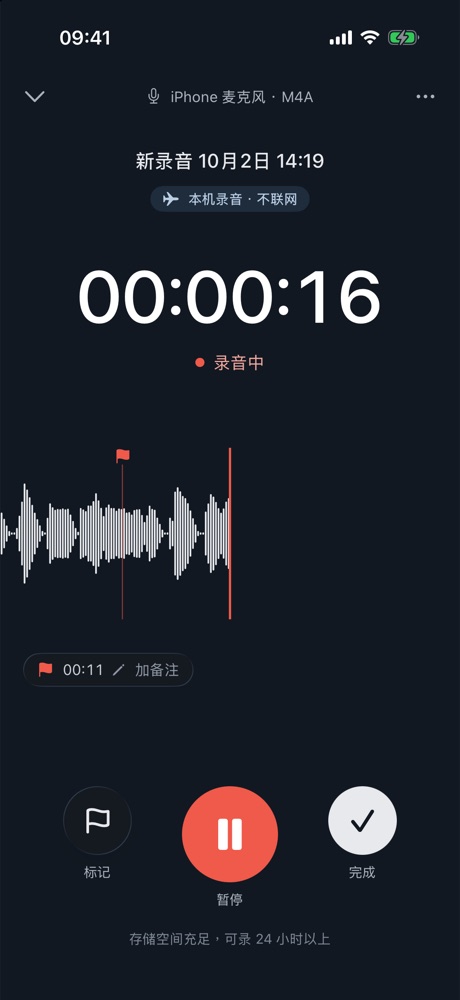
标记 Marker · 暂停 Pause · 完成 Done
Record
Start in one tap. Nothing gets lost.
- Start from the Lock Screen, Dynamic Island, Action button or Control Center
- Drop markers and notes while you record, then jump straight to them
- Audio is written as you go, so it survives the app being closed
- Pauses for phone calls and resumes when they end
- Warns you right away if it’s too loud, too quiet or low on space
Transcripts
Accurate, quick to fix, easy to find
Mandarin speech recognition
Mandarin, and Mandarin mixed with English. Punctuation and paragraphs are added for you, and it keeps going with the phone locked.
Speaker labelsLifetime
Paragraphs are split by speaker. Rename a speaker once and the whole transcript follows; move a paragraph to someone else if it’s wrong.
Your vocabulary
Add names, companies and terms of art, and words that sound alike are corrected after transcription. Common legal and medical mix-ups are fixed too.
Tap to play from there
Tap any sentence to play from that point. Skip silence and change the speed.
Highlight and edit
Highlight what matters, fix words, find and replace. Every step can be undone.
Search every sentence
Search titles, transcripts, marker notes and summaries across all recordings, then jump to the sentence.
On-device AILifetime
Notes in the format your profession uses
The AI reads the whole recording on this phone. Ask it questions, get a summary or a mind map, or use one of the templates below. Every point is linked to the moment it was said, so you can play it back and check.
Lawyers
Client meeting notes当事人会谈要点
Parties · timeline of facts · claims · evidence · issues in dispute · the lawyer’s advice, verbatim · to-dos
Doctors
Outpatient record门诊记录
Chief complaint · present illness · past history · allergies · medication · tests · diagnosis, verbatim · orders
Counselors
Session notes咨询记录
Client’s concerns · topics this session · interventions · homework · next session · statements to watch
HR
Interview record面试记录
Position · questions and answers · key experience · claims to verify · the candidate’s own questions
Journalists and researchers
Interview notes访谈整理
Against your outline (optional) · key Q&A · quotable lines · topics outside the outline
It only extracts what was said in the recording. It doesn’t diagnose, advise or judge anyone. AI features need an iPhone with Apple Intelligence, or an iPhone with enough memory to download the on-device model.
Export and backup
Export in the format you hand in
A Word memo for a client, SRT subtitles for a video, a CSV to check in a spreadsheet, all from the same transcript.
- New phone: export every recording and transcript, then restore them as they were
- Face ID lock hides titles on the Lock Screen, widgets and notifications
- Deleted recordings stay in Recently Deleted for 30 days
Free
Lifetime
Price
Transcription is free, with no time limit
Transcription runs on your phone, so there are no server costs and nothing to charge by the minute. The tools for working with recordings are a one-time purchase. No subscription.
Free
Always free, no time limit
- Record and transcribe offline
- Markers, highlights, edits, find and replace
- Search all recordings
- Copy text, export TXT and the original audio
- Face ID lock, backup and restore
Lifetime
Pay once. It never renews
- Speaker labels
- Word, PDF, SRT subtitle and CSV export
- Questions, summaries and mind maps
- Professional notes for lawyers, doctors, counselors, HR and research
The price is shown in the App Store. Restore the purchase on a new phone with the same Apple ID.
Questions
Before you start
Does transcription need the internet?
No. Before the first transcription, iOS downloads the speech model from Apple once (this needs the internet; nothing is uploaded). After that it works in airplane mode.
Which languages are supported?
Mandarin, including Mandarin mixed with English words. The app’s interface is in Simplified Chinese.
How long can a recording be? How long does transcription take?
There’s no time limit. Speed depends on your iPhone and the length of the recording; the transcription card shows an estimate. You can lock the phone or switch apps, and you’ll get a notification when it’s done.
I changed phones. Do I keep my recordings and the purchase?
iPhone migration or a full backup brings everything across: recordings, transcripts, markers and summaries. You can also export everything on the old phone and restore it from Settings on the new one. For the purchase, use the same Apple ID and tap Restore Purchase in Settings.
Before the next conversation that matters, press record
Recording and transcription happen on your iPhone, even in airplane mode.